Home › Forums › AWS › AWS Certified Security – Specialty › Active Directory Trust
-
Active Directory Trust
-
An organization is implementing a security policy in which their cloud-based users must be contained in a separate authentication domain and prevented from accessing on-premises systems. Their IT Operations team is launching and maintaining a number of Amazon RDS for SQL Server databases and EC2 instances. The organization also has an on-premises Active Directory service that contains the administrator accounts that must have access to the databases and EC2 instances.
How would the Security Engineer manage the AWS resources of the organization in the MOST secure manner? (Select TWO.)
Answer: Set up a one-way trust relationship from the existing Active Directory in the on-premises data center to the new Active Directory service in AWS.
Answer:Using AWS Directory Service, set up an AWS Managed Microsoft AD to manage the RDS databases and EC2 instances.
In a normal AD enviroment, if domain A trusts Domain B, users in Domain B can access resources in domain A. However, the answer says Domain A trusts domain B, therefore users in Domain A can access resources in domain B, am i missing something specific about AD logic in cloud?
-
Hi Jagan,
The scenario says that you have to implement a security policy in which the cloud-based users are prevented from accessing the on-premises systems. The on-premises data center contains the administrator accounts that must have access to the AWS resources (RDS and EC2 instances). Therefore, we need a one-way trust relationship that allows requests from on-premises users to access the VPC resources.
It also depends on your “Direction of Trust” setting which could be One-way:incoming or One-way:outgoing type.
Just as mentioned in the explanation, there are three trust relationship directions:
1. One-way:incoming – Users in the specified realm will not be able to access any resources in this domain.
2. One-way:outgoing – Users in this domain will not be able to access any resources in the specified realm.
3. Two-way (Bi-directional) – Users in this domain and users in the specified realm will be able to access resources in either domain or realm.
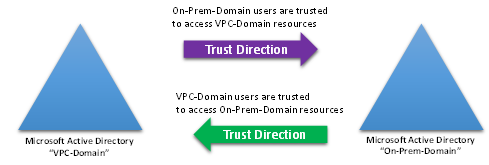
I understand what you are saying since the correct option doesn’t mention the “Trust Direction” for the Active Directory integration. This is best represented by this diagram:
https://dmhnzl5mp9mj6.cloudfront.net/security_awsblog/images/RonCully_trustdiagram.png
For example, let’s say you have two domains: VPC-Domain and On-Prem-Domain. A one-way trust from VPC-Domain to On-Prem-Domain means that users authenticated in On-Prem-Domain are trusted in VPC-Domain (the trust direction indicated by the purple arrow in the above diagram). A one-way trust from On-Prem-Domain to VPC-Domain (the trust direction indicated by the green arrow in the above diagram) means users authenticated in VPC-Domain are trusted in On-Prem-Domain.
Reference:
I believe that you are referring to the relationship described above. So when you read the correct option: “Set up a one-way trust relationship from the existing Active Directory in the on-premises data center to the new Active Directory service in AWS.” – the “trust” seems reversed. The provided answer didn’t mention if it is an incoming or outgoing One-way trust.
Since this is more of an advanced Microsoft Active Directory setup, I chose to simplify the terms in the options to focus more on the AWS-side of things. The correct option simply means that we need a one-way trust relationship that allows requests from on-premises users to access the VPC resources, but not vice-versa.
Let us know if you need further assistance. The Tutorials Dojo team is dedicated to help you pass your AWS exam on your first try!
Regards,
Jon Bonso @ Tutorials Dojo
-
<div>I am very dissapointed that this question has still not been addressed satisfactorily. The addition of the trust diagram and the nature of direction of trust does not provide a good reason not for tutorialsdojo to neglect tidying up the wording of the answers.</div>
The answer “Set up a one-way incoming trust in the existing on-premises Active Directory and a one-way outgoing trust in the new Active Directory in AWS.”, that is marked as being correct is not correct. Either the answers should be updated to reflect this, or the wording should be clarified.
Option 4 is incorrect becaue setting up a one-way incoming trust in the existing on-premises Active Directory (AD) means that the on-premises AD will trust the AWS AD for authentication, allowing users authenticated by AWS AD to access on-premises resources. This setup violates the requirement to prevent cloud-based users from accessing on-premises systems. The correct configuration is to set up a one-way incoming trust in the new Active Directory in AWS and a one-way outgoing trust in the existing on-premises AD. This ensures that only on-premises authenticated users can access AWS resources, maintaining the separation and security required by the organization’s policy.
Please put the A team onto this.
-
Hello PETERHODES,
Thank you for your feedback.When setting up a one-way trust relationship from the existing on-premises Active Directory (Domain A) to the new Active Directory service in AWS (Domain B), it means that Domain A trusts Domain B. Cloud-based users (in Domain B) can authenticate against the AWS Managed Microsoft AD (Domain B) but they do not have access to on-premises resources (in Domain A).
A one-way trust is unidirectional: Domain A trusts Domain B, but Domain B does not trust Domain A. This setup ensures that cloud users remain isolated within their own authentication domain and cannot access on-premises systems.
https://learn.microsoft.com/en-us/entra/identity/domain-services/concepts-forest-trustThe one-way trust ensures security by preventing unauthorized access from the cloud to on-premises systems.
I hope this helps. Let us know if you need any further assistance.
Regards,
JR @ Tutorials Dojo-
This reply was modified 1 year, 4 months ago by
JR-TutorialsDojo.
-
This reply was modified 1 year, 4 months ago by
-
-
-
The method of Domain trusts has been consistent (though poorly explained) since NT 4.0.
Example: “I am trusting you with my car”, where “I” am the owner (Domain Admin) of a “car” (resource in the Resource Domain) and “you” are a user (in the Users Domain)– The car resides in the Resource Domain.
– You reside in the Users domain. You are in the Users Domain & want access to the resource
– “I” am admin of the Resource Domain, and I provide access to you in the users domain by creating the one-way trust.
The users are on-premise, the resources are in AWS, and the one-way trust is provided from the AWS AD –> to the on-premise AD
Hence: “Set up a one-way trust relationship from the new Active Directory in AWS to the existing Active Directory service in the on-premises data center.” is the correct answer.
-
Azure developer here. I concur with k-booth. The answer should be “Set up a one-way trust relationship from the new Active Directory in AWS to the existing Active Directory service in the on-premises data center.” to properly depict the flow of authentication for Azure AD / EntraID
-
Hello K-Booth and George,
Thank you for your feedback. In the given scenario, the organization is implementing a security policy requiring cloud-based users to be contained in a separate authentication domain and prevented from accessing on-premises systems.
Please note that a one-way trust is a unidirectional authentication path: Domain A trusts Domain B, but Domain B does not trust Domain A. This setup ensures that cloud users remain isolated within their own authentication domain and cannot access on-premises systems.
Hence, the correct answers are:
– Use AWS Directory Service, set up an AWS Managed Microsoft AD to manage the RDS databases and EC2 instances.
– Set up a one-way incoming trust in the existing on-premises Active Directory and a one-way outgoing trust in the new Active Directory in AWS.You can find more information at https://learn.microsoft.com/en-us/entra/identity/domain-services/concepts-forest-trust.
The one-way trust ensures security by preventing unauthorized access from the cloud to on-premises systems.
Feel free to reach out if you need further assistance!
Regards,
JR @ Tutorials Dojo-
<div>Your answer is just a repeat of your original assertion, and the documentation you provide does not support the answer you’ve given.
</div>Multiple users have come to this page to explain the answer is incorrect.
My colleague Jordan who has passed this exam twice (because of renewal) answered the same. I asked him blindly without explaining to him there was a difference of opinion.
Chat-GPT answers the same way as all of the many people that have said the current answer is wrong.
Chat-GPT has provided an explanation below of why the document you provided does not support your assertion.
Conclusion:
The Microsoft document does not support TutorialsDojo’s assertion. Instead, it reinforces the correct approach: the trust direction should be such that AWS (Domain B) trusts the on-premises AD (Domain A). This setup allows on-premises administrators to manage AWS resources securely without allowing cloud-based users to access on-premises systems. The Microsoft documentation supports this configuration as the more secure and aligned approach to maintaining distinct authentication domains and minimizing access risks.
Let’s break down the response from TutorialsDojo, analyze the Microsoft documentation they provided, and assess whether it supports their assertion or the original interpretation.
TutorialsDojo’s Explanation Recap:
- One-Way Trust from On-Premises AD (Domain A) to AWS AD (Domain B):
- Claim: Domain A (on-premises) trusts Domain B (AWS). According to their interpretation, this means cloud users in Domain B can authenticate against AWS AD but do not have access to on-premises resources in Domain A.
Analyzing the Microsoft Documentation:
The document provided in the Microsoft link is about “Concepts: Forest and Domain Trusts” for Azure AD Domain Services. It explains various types of trusts, including one-way and two-way trusts, and the implications of trust relationships between different domains and forests.
-
One-Way Trust Explanation (According to Microsoft):
- In a one-way trust, the trusting domain (let’s call it Domain A) trusts the trusted domain (Domain B).
- Implication: This means that users from Domain B can be granted access to resources in Domain A, provided they have the necessary permissions. Conversely, users in Domain A cannot access resources in Domain B unless there’s a reciprocal trust.
- Example (from the document): If Domain A trusts Domain B, Domain B’s users can access resources in Domain A, but Domain A’s users cannot access Domain B’s resources.
-
Assessing TutorialsDojo’s Interpretation:
- TutorialsDojo claims that when Domain A (on-premises) trusts Domain B (AWS), it prevents cloud users from accessing on-premises resources. However, according to the Microsoft documentation, this setup would actually allow users from Domain B (AWS) to potentially access resources in Domain A (on-premises) if permissions are granted.
- Therefore, the Microsoft document does not support their assertion. Instead, it indicates that a one-way trust in this direction would allow cloud users (from AWS AD) to access on-premises resources, which contradicts the security requirement to prevent this.
Correct Interpretation and Alignment with Microsoft Documentation:
- One-Way Trust from AWS AD (Domain B) to On-Premises AD (Domain A):
- Microsoft’s Guidance: If Domain B (AWS) trusts Domain A (on-premises), it means that on-premises users can access resources in AWS (Domain B), but not vice versa.
- Security Alignment: This setup ensures that on-premises users (administrators) can manage AWS resources, while cloud-based users are contained within the AWS domain and do not have access to on-premises systems.
This interpretation directly aligns with the Microsoft documentation and supports the original recommendation:
- Using AWS Directory Service, set up an AWS Managed Microsoft AD to manage the RDS databases and EC2 instances.
- Set up a one-way incoming trust relationship in the new Active Directory in AWS and a one-way outgoing trust in the existing on-premises Active Directory.
Conclusion:
The Microsoft document does not support TutorialsDojo’s assertion. Instead, it reinforces the correct approach: the trust direction should be such that AWS (Domain B) trusts the on-premises AD (Domain A). This setup allows on-premises administrators to manage AWS resources securely without allowing cloud-based users to access on-premises systems. The Microsoft documentation supports this configuration as the more secure and aligned approach to maintaining distinct authentication domains and minimizing access risks.
-
Hello PETERHODES,
Thanks for the feedback.
Please note that Chat-GPT can sometimes make mistakes, and it’s essential to cross-reference with reliable sources.
The Microsoft documentation clearly states that “A one-way trust is a unidirectional authentication path created between two domains. In a one-way trust between Domain A and Domain B, users in Domain A can access resources in Domain B. However, users in Domain B can’t access resources in Domain A.”
The documentation from Microsoft that supports this statement can be found at the following:
- https://learn.microsoft.com/en-us/entra/identity/domain-services/concepts-forest-trust
- https://learn.microsoft.com/en-us/answers/questions/75639/question-regarding-setting-up-a-one-way-forest-tru
- https://learn.microsoft.com/en-us/azure/architecture/reference-architectures/identity/adds-forest
Our correct answers are supported by this document: https://learn.microsoft.com/en-us/azure/architecture/reference-architectures/identity/adds-forest
In the scenario where on-premises users need access to cloud resources but not vice versa, the following configurations need to be implemented:
– On-premises trust: One-way, incoming
– Cloud trust: One-way, outgoingTherefore, the correct answers are:
– Using AWS Directory Service, set up an AWS Managed Microsoft AD to manage the RDS databases and EC2 instances.
– Set up a one-way incoming trust in the existing on-premises Active Directory and a one-way outgoing trust in the new Active Directory in AWS.
I hope this helps!
Regards,
JR @ Tutorials Dojo - https://learn.microsoft.com/en-us/entra/identity/domain-services/concepts-forest-trust
- One-Way Trust from On-Premises AD (Domain A) to AWS AD (Domain B):
-
-
-
This is a very technical discussion, really great read. Thank you Jon for shedding light on this item.

-
<div>You’re repeating yourself, and I am sorry to say that you still haven’t provided any evidence to support your claim.</div>
This statement that you quote does not support your case, but in fact supports the case that I am making.
The Microsoft documentation clearly states that “A one-way trust is a unidirectional authentication path created between two domains. In a one-way trust between Domain A and Domain B, users in Domain A can access resources in Domain B. However, users in Domain B can’t access resources in Domain A.”
You
seem to still misunderstand that it is the terms FROM and TO that are
incorrect and the documents you have quoted do not support your case.-
Hi Peter,
Jon Bonso here from Tutorials Dojo here. First of all, I would like to thank you for sharing your detailed thoughts, especially your correction, on the ambiguous parts of our content.
We acknowledge that this particular item can be further improved. I am actually the one who answered this question way back in 2020, and I apologize if my team and I failed to update this particular item more comprehensively than we should.
My associate, @JR-TutorialsDojo , and I will further update this to properly reflect the correct solution that’s properly supported by the official Microsoft Azure documentation.
Our goal here is to have a correct option that simply says that we need a one-way trust relationship that allows requests from on-premises users to access the VPC resources, but not vice-versa.
Could you kindly share a better wording for the solution please? I honestly would want to hear from you so we can further improve our content.
Currently, the question and the list of options are shown below:
An organization is implementing a security policy in which their cloud-based users must be contained in a separate authentication domain and prevented from accessing on-premises systems. Their IT Operations team is launching and maintaining a number of Amazon RDS for SQL Server databases and EC2 instances. The organization also has an on-premises Active Directory service that contains the administrator accounts that must have access to the databases and EC2 instances.
How would the Security Engineer manage the AWS resources of the organization in the MOST secure manner? (Select TWO.)
✅ Using AWS Directory Service, set up an AWS Managed Microsoft AD to manage the RDS databases and EC2 instances.
❌ Set up and configure AWS Service Catalog to manage the RDS databases and EC2 instances.
❌ Set up a one-way incoming trust relationship in the new Active Directory in AWS and a one-way outgoing trust in the existing on-premises Active Directory.
❌ Set up a two-way trust relationship between the new Active Directory in AWS and the existing Active Directory service in the on-premises data center.
✅ Set up a one-way incoming trust in the existing on-premises Active Directory and a one-way outgoing trust in the new Active Directory in AWS.
I understand that the issue here is the wording for the last option that’s tagged as correct (if I am not mistaken)
Thank you in advance for sharing your expertise with this. Technical discussions like this truly help improve our content and remediate any ambiguous answers in our question bank.
Cheers,
Jon Bonso
-
-
Thankyou Jon,
I’ll look at this over the weekend and advise.
Kind Regards.
-
Hi Again Jon,
I’ve thought about how you might adress this and I can present two options.
This is the wording of the two answers (relating to trust and which are mutually exclusive)as they stand now :
Answer 1 “Set up a one-way incoming trust relationship in the new Active Directory in AWS and a one-way outgoing trust in the existing on-premises Active Directory.”
Answer 2 “Set up a one-way incoming trust in the existing on-premises Active Directory and a one-way outgoing trust in the new Active Directory in AWS.”
The first option is to simply change the correct answer from 2 (above) to 1 (above).
The second option is to change both answers 1 and 2 to the following (This approach explicitly clarifies the direction and scope of the trust relationship, making it clear which Active Directory trusts the other and what access is permitted.)
Answer 1 “Set up a one-way trust where the new Active Directory in AWS trusts the existing on-premises Active Directory. This means that users from the on-premises Active Directory can access AWS resources, but AWS-based users cannot access on-premises systems.”
Answer 2 “Set up a one-way trust where the on-premises Active Directory trusts the new Active Directory in AWS. This means that users from the AWS-based Active Directory can access on-premises resources, but on-premises users cannot access AWS systems.”
In these rephrased questions, answer 1 is correct.
I hope this helps.
Peter.
-
Hello PETERHODES,
Thank you for your input.
We will make the necessary updates, which should be reflected on the portal soon.
If you have any further suggestions or feedback, please don’t hesitate to share them with us. We are dedicated to enhancing our practice tests based on user input.
Best regards,
JR @ Tutorials Dojo-
Hi JR,
are you considering your sales model. Wanting to revisit some of the practice exams I had previously purchased, I not realise that I must purchase them again.
I find this model unsatisfactory. I realise you need to be competitive, but you could make the material permanent at a slightly higher cost.
Given that I have alternatives – I have a subscription with Pluralsight, and I can easily get Chat-gpt to create practice questions – I would simply go elsewhere.The reason I would continue to use your platform is that I have previously had success with it, but the “limited time” model simply alienates me from the entire platform. It’s my view that instead of your model increasing your total revenue, instead it loses you revenue by reducing the trust in the relationship you at first build.
Best Regards,
Peter Rhodes.
-
Thank you for your message, Peter.
Take note that from the get-go, we do not offer lifetime access in the Tutorials Dojo Portal, even before we started our operations in 2020. All courses and practice exams have ample labels showing that we only provide limited-time access to the product.
These practice exams, video courses, eBooks, and other reviewers require constant updates, and those updates don’t come cheap. Almost every quarter, or every month even, AWS pushes new updates on its certification exam content. One example of this is the new AWS SysOps Exam (SOA-C02) which will be renamed to AWS CloudOps (SOA-C03) next month. This entails a massive amount of effort on our team to update the current content and create new practice questions, video lessons, admin tasks et cetera; on top of the monthly server costs and staff salaries to keep the site running.
Some platforms, such as Udemy, have an evergreen model that offers lifetime access, but that one isn’t sustainable and unfair to most content creators. It’s like telling the creators to answer user inquiries, churn out new content every quarter (for life), spend on cloud costs forever for a one-time fee of $14. That’s clearly unsustainable, even if we slightly raise the price to let’s say $16 or $18 as your suggested.
You’ll rarely see any “lifetime access” to digital products nowadays, especially the ones that require constant updates, like these cloud certification reviewers. Even Pluralsight and Udemy Pro have their respective subscription models and limited-time content access.
Demanding lifetime access to a product that requires regular updates is akin to paying for a meal from a fast-food chain ONCE and demanding a refill of your drink and unlimited food FOR LIFE. That seems like modern slavery to me.
Regards,
Jon Bonso
-
-
-
-
Hello everyone,
The option that says: Set up a one-way trust where the on-premises Active Directory trusts the new Active Directory in AWS is incorrect because if the on-premises AD trusts the AWS AD, it means on-premises users could potentially authenticate directly to AWS resources. This violates the requirement of isolating cloud-based users from on-premises systems.
Surely this is not true? Or at least ambiguous?
If the on-prem AD trusts AWS AD, it means AWS AD users could potentially authenticate to on-prem services? Where as the quote above says if the on-prem AD trusts AWS AD, on-prem users could potentially authenticate to AWS services.
-
Hello S M,
Thank you for bringing this to our attention.
In Active Directory trust relationships, the trusting domain allows users from the trusted domain to access its resources. So:
– If on-premises AD trusts AWS AD, then AWS AD users can potentially access on-premises resources.
– Conversely, if AWS AD trusts on-premises AD, then on-premises users can access AWS resources.
We will make the necessary updates, which should be reflected on the portal soon.
Best regards,
JR @ Tutorials Dojo
-
Log in to reply.